
Beware of Phishing Email Tech Support Scam
A phishing email scam is alarming users with fake $899 iPhone purchases via PayPal. Don't panic! Protect your PC and personal information. Verify transactions through official channels and consider installing Malwarebytes to safeguard against phishing scams.
PHISHING ATTACK
4/28/20268 min read
Phishing Emails Tech Support Scam
Download Malwarebytes
Real-Time Protection from Phishing Emails
A recent phishing email scam is targeting users with alarming emails claiming an $899 iPhone purchase was made through PayPal. The message urges recipients to call a provided phone number to cancel the transaction. This tactic exploits panic, tricking victims into contacting fraudsters who then attempt to steal personal or financial information. Cybersecurity experts warn users to avoid calling such numbers and instead verify transactions directly through official PayPal channels. Don't feel sad after you lose all the money in your bank account. Install Malwarebytes and protect your PC, Laptop, Tablet, and Phone from phishing email scams.
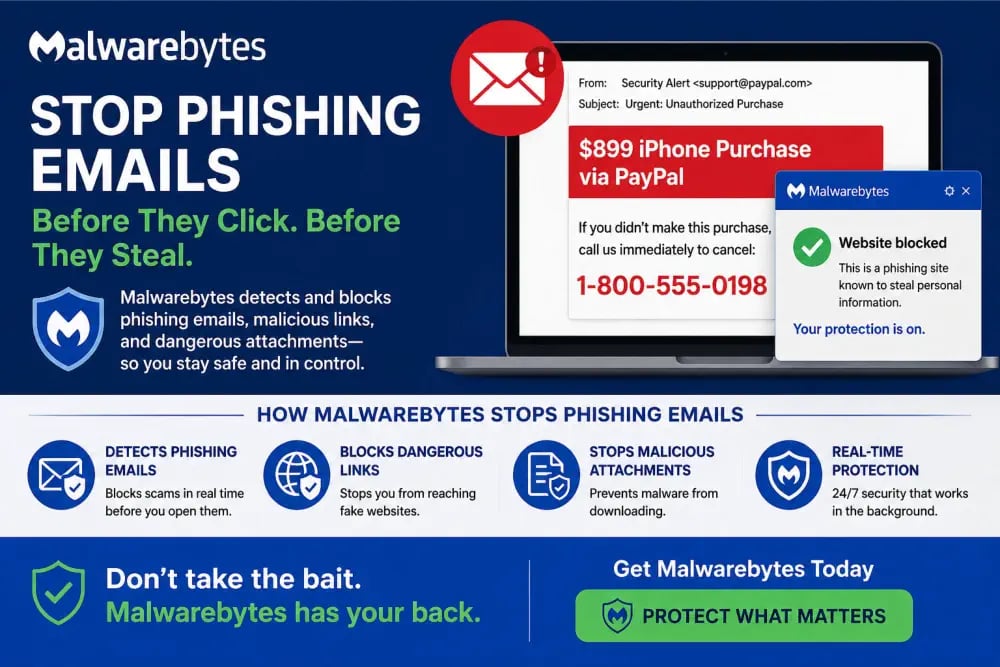

Fake PayPal iPhone Purchase Phishing Email Scam
In recent months, a new wave of phishing emails has targeted unsuspecting users with alarming messages claiming that an iPhone priced at $899 was purchased through PayPal. These phishing emails are crafted to trigger immediate panic. Imagine waking up, checking your inbox, and seeing a receipt for an expensive iPhone you never bought. That’s exactly the emotional reaction cybercriminals are counting on. The phishing email often looks legitimate, featuring familiar logos and formatting similar to PayPal. For a beginner, it’s nearly impossible to tell the difference at first glance. For example, a user named Mark receives such an email early in the morning. Without thinking, he quickly scans the message and sees a “customer support number” to call. His instinct is to fix the issue immediately. This urgency is what drives the scam’s success. These phishing attempts are not random; they are carefully engineered psychological traps designed to exploit fear, confusion, and haste. Visit Malwarebytes Homepage and learn how to protect all your devices, if you do not want to fall victim to such Phishing Emails.
What Exactly Happens in Phishing Email Scam?
The scam typically begins with a phishing email that appears to be a legitimate purchase confirmation. It claims that an expensive device, usually an iPhone, has been bought using the recipient’s PayPal account. The email includes transaction details, a fake invoice number, and a support phone number. Take the case of Maya, who receives a message stating that her PayPal account has been charged $74,000 for an iPhone. The email urges her to call a number immediately if she didn’t authorize the transaction. Panicked, she calls the number. On the other end is a scammer pretending to be a support agent. They reassure her but ask for sensitive information like login credentials or even remote access to her computer. This is where the real phishing attack begins. The email itself was just bait. The actual goal is to trick the victim into handing over personal or financial information. In many cases, victims are also asked to install software that gives hackers control over their devices.
The Hacker’s Modus Operandi Explained
Cybercriminals behind this phishing email scam follow a predictable but effective pattern. First, they create a convincing email template that mimics trusted brands like PayPal. Then they distribute these emails in bulk using automated systems. For instance, a scammer may send thousands of emails daily, knowing that even a small percentage of responses can yield significant profits. Once a victim engages with their phishing email, either by clicking a link or calling the number given in the email, the attacker moves to the next stage. They may impersonate customer support, create fake urgency, or even threaten account suspension. Consider a user who clicks a link in the phishing email. The link leads to a fake login page designed to look identical to PayPal. The user enters their credentials, unknowingly handing them over to the attacker. Within minutes, the hacker can access the real account and initiate unauthorized transactions. This layered approach, email, emotional manipulation, and technical deception, is what makes phishing so effective and dangerous.
Why This Phishing Email Feels So Real
One of the most alarming aspects of this phishing email scam is how authentic it appears. Attackers invest time in replicating official branding, including logos, fonts, and even email signatures. For example, the email might include a professional-looking invoice, complete with order numbers and billing details. It may even use language that mimics real PayPal communication. A beginner user might think, “This looks exactly like my previous PayPal emails.” Scammers also use spoofed email addresses that closely resemble legitimate ones. Instead of a real PayPal domain, the email might come from something like “support-paypal@secure-mail.com.” At a glance, this difference is easy to miss. In one scenario, a user named Joseph ignored the warning signs because the email looked “too real to be fake.” He later realized that the sender’s address was slightly altered. This level of detail is what makes phishing emails so convincing and why even cautious users can fall victim.
How Phishing Email Scam Affects Users
The impact of falling for such a phishing scam can be severe. At the most basic level, users may lose money through unauthorized transactions. But the damage often goes much deeper. For example, if a user shares their login credentials, attackers can access not just PayPal but other accounts as well, especially if the same password is reused. This can lead to identity theft, where the attacker uses the victim’s information for fraudulent activities. In another case, a victim installed remote access software as instructed by the scammer. The attacker then gained full control of the system, accessing files, emails, and even saved passwords. The result was not just financial loss but also a complete breach of privacy. For most users, this can be overwhelming. The realization that a simple email could lead to such consequences highlights the seriousness of phishing email attacks.
How Dangerous Is a Phishing Email Scam?
This scam is not just a minor inconvenience; it is a serious cybersecurity threat. Phishing email attacks are among the most common methods used by cybercriminals because they exploit human behavior rather than technical vulnerabilities. For instance, even a well-protected system can be compromised if a user willingly provides their credentials. This makes phishing particularly dangerous. Unlike traditional hacking, it doesn’t require breaking into systems; it relies on tricking users into opening the door themselves. Statistics consistently show that phishing emails are responsible for a large percentage of data breaches worldwide. In the context of the fake iPhone purchase scam, the danger lies in its simplicity and effectiveness. Imagine a user who has never encountered such a scam before. The urgency of the message overrides their judgment, leading them to act without verifying the information. This is exactly what attackers rely on. To protect yourself from phishing email scams, we recommend that you install Malwarebytes on all your devices, like PC, laptops, tablets, and Phones today, because Malwarebytes provides real-time protection from phishing attacks, using behavioural analysis.
Recognizing the Warning Signs of Phishing Attacks
Understanding the warning signs is the first step in preventing phishing attacks. These phishing emails often contain subtle clues that something is not right. For example, the phishing email might create a sense of urgency, such as “Call now to cancel this transaction.” Legitimate companies rarely pressure users in this way. Another common sign is grammatical errors or unusual phrasing. Consider a user who notices that the email says “Your account has been charged.” While this may seem minor, it’s often a sign of a scam. Additionally, suspicious links and unfamiliar sender addresses are strong indicators of phishing. A simple habit like hovering over links before clicking can reveal whether the URL is legitimate. For beginners, developing these habits can make a significant difference in avoiding phishing attacks.
Do’s and Don’ts for Staying Safe from Phishing Emails
When dealing with suspicious phishing emails, following basic guidelines can prevent major problems. Always verify the source before taking any action. Instead of clicking links in the email, visit the official website directly. For example, if you receive a PayPal notification, log in to your account through the official website or app to check for any transactions. Never call phone numbers provided in suspicious emails. On the other hand, avoid sharing personal information through email or over the phone unless you are certain of the recipient’s identity. Do not download attachments or install software from unknown sources. A beginner might think, “It’s just one click, what could go wrong?” But that one click can lead to significant consequences. Practicing caution and skepticism is essential in today’s digital environment.
How Malwarebytes Protects You from Phishing Emails
Modern cybersecurity solutions like Malwarebytes play a crucial role in defending against phishing attacks. Its real-time protection continuously monitors for malicious activity, blocking suspicious websites and links before they can cause harm. For instance, if a user clicks on a phishing link, Malwarebytes can detect the threat and prevent the page from loading. This acts as a safety net, especially for beginners who may not recognize phishing email scam immediately. In another scenario, Malwarebytes identifies and blocks malicious downloads, such as fake software recommended by scammers. This prevents attackers from gaining control of the user’s device. Malwarebytes Antimalware software also scans emails and web traffic for known phishing patterns, providing an additional layer of security. This proactive approach ensures that threats are stopped before they reach the user.
Real-Life Example of Malwarebytes Protection in Action
Consider a user named Olivia who receives the fake iPhone purchase email. She clicks the link out of curiosity, but Malwarebytes immediately blocks the website, displaying a warning message. Instead of proceeding, Olivia realizes that the email is likely a phishing scam. She deletes the message and avoids potential harm. Without such protection, she might have entered her credentials on a fake site. This example highlights how Malwarebytes real-time protection can make a critical difference. It doesn’t just react to threats; Malwarebytes actually prevents them from affecting the user in the first place.
Why Every Device Needs Protection
Phishing email scams are not limited to computers. They can target smartphones, tablets, and any device with email access. This makes comprehensive protection from phishing attacks essential. For example, a user might receive the phishing email on their phone and click the link without thinking. Mobile devices are often less secure than computers, making them an attractive target for attackers. Installing Malwarebytes on all devices ensures consistent protection across platforms. Whether you’re checking emails on your laptop or browsing on your phone, the Malwarebytes software provides the same level of security. For users, this means peace of mind. You don’t have to constantly worry about identifying every potential threat. The Malwarebytes Antimalware software does it for you and keeps your devices safe.
Building Long-Term Cyber Awareness
While tools like Malwarebytes are essential, user awareness remains a critical component of cybersecurity. Understanding how scams work and staying informed about new threats can significantly reduce the risk of falling victim to scams like phishing emails. For instance, regularly reading about common phishing tactics helps users recognize patterns. Over time, even beginners can develop the ability to spot suspicious emails quickly. Think of it as learning to recognize a fake currency note. At first, it’s difficult, but with practice, it becomes second nature. The same applies to phishing emails. Combining awareness with reliable security software creates a strong defense against cyber threats.
Staying One Step Ahead of Phishing
The fake PayPal iPhone purchase phishing email scam is a clear reminder of how sophisticated phishing attacks have become. It’s not just about technology. It is about understanding human behavior and exploiting it. By staying vigilant, recognizing warning signs, and using trusted security solutions like Malwarebytes, all users can protect themselves from these threats. The key takeaway is simple: don’t trust unexpected emails, verify before acting, and always use reliable protection. A single moment of caution can prevent significant loss and stress. In today’s digital world, Cybersecurity is not optional. Install Malwarebytes on all your devices now and stay protected.
Cyber Security Threats
Malwarebytes Premium
Protect all your devices from all Malware and Viruses
© 2025. All rights reserved.